How do I cancel my subscription, and what happens after I cancel?
Everything you need to know about cancelling your subscription, billing changes, and what to expect next
This guide explains how to cancel your Rightangled subscription, when cancellation takes effect, and what happens to your billing and payment details after you unsubscribe.
How to cancel your subscription
You can cancel your subscription through your account:
- Log in to your Rightangled account
- Go to Manage my subscription
- Select Cancel subscription (Unsubscribe)
- Confirm your request and select a cancellation reason

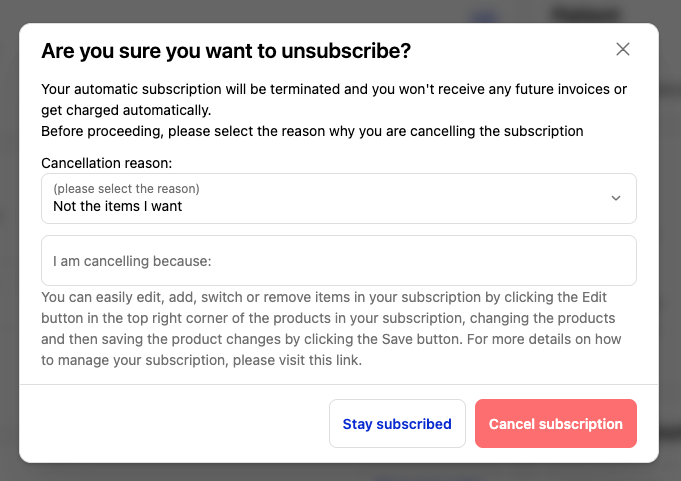
Once confirmed:
- Your automatic subscription will be terminated
- You will not receive future invoices
- You will not be charged automatically going forward
Important: cancelling vs editing your subscription
Before cancelling, you may want to consider adjusting your subscription instead:
- Edit, add, switch, or remove items
- Tailor your plan to better suit your needs
To do this:
- Click Edit within your subscription
- Make your changes
- Click Save
This allows you to keep your subscription active without fully cancelling.
Timing is important ⚠️
To successfully stop upcoming charges:
-
You can manage this directly through your Rightangled account, and your subscription will be cancelled immediately once the change is confirmed.
.If you request a pause through our support team via email or by phone , please ensure you do so at least 3 working days before your next billing date to give amble of time for those charges to take effect.
Additionally:
- A renewal reminder email is sent 24 hours before your subscription renews
- If cancellation is not completed before processing, your next order may proceed
What happens to existing orders?
Cancelling your subscription:
- Stops future renewals only
- Does not cancel orders already in progress
Orders that have:
- Entered clinical review
- Been approved
- Entered pharmacy processing
- Been dispatched
👉 Cannot usually be cancelled due to regulatory requirements so it may no longer be possible to cancel and refund the order.
What happens to your payment method?
When you cancel your subscription:
- Your payment method may be revoked if you have no other active subscriptions
- This is done to protect against fraud and unauthorised charges
Cancelled by mistake? (24-hour window)
If you cancelled your subscription accidentally:
- You can reinstate your subscription within 24 hours
- Your payment method can be restored during this period
- Billing will resume if the subscription is reactivated within this window
After 24 hours:
- You will need to re-enter your payment details to start a new subscription
After cancellation
Once your subscription is cancelled:
- No further automatic payments will be taken
- Your subscription will remain inactive unless reactivated
- You can return and start a new subscription at any time
Need help?
If you’re unsure about cancelling or need assistance:
- Contact our support team at info@rightangled.com
- Include your account details and request
We’ll be happy to guide you through the process.
Summary
Cancelling your Rightangled subscription is simple and can be done through your account. Make sure to cancel in time to avoid charges, and remember that cancellation only affects future orders. If cancelled by mistake, you have a 24-hour window to restore your subscription and payment method.
Thanks for your feedback!